HWPLOT 2.0
A routine for displaying the perturbative part of a standard
HERWIG
event.
Written by
Christopher
Lester
Pictures
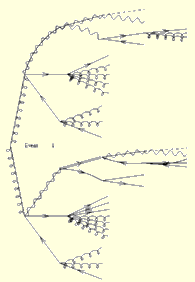 Here
are two examples of unlabeled postscript output from HWPLOT: Event
11 and Event 13. Here
are the same events, but this time with labels turned on: Event
11 and Event 13. .These
particular events used the GMSB model.
Here
are two examples of unlabeled postscript output from HWPLOT: Event
11 and Event 13. Here
are the same events, but this time with labels turned on: Event
11 and Event 13. .These
particular events used the GMSB model.
How does HWPLOT work ?
HWPLOT is a module which must be linked with
HERWIG
and
a main program loop. It contains a subroutine hwplot which, if
called, creates a .in file containing the event-diagram in a format
suitable for input to my modified version of feynfig
(which you will need to compile). feynfig can read this file and
write it out in xfig format for either direct editing in xfig,
or immediate conversion into postscript for viewing or printing. ( xfig
can be turned into postscript using
fig2dev -L ps
or similar commands on other systems.)
For example:
You might call hwplot from within your event generation program
like this:
      SUBROUTINE myanalysis

      include 'HWPLOT.INC'

      logical iWantTextLabelsToo
      character*(hwpltf) myFilePrefix
      integer MaxGen

      ... lots of analysis ...

      iWantTextLablesToo=.true.
      myFilePrefix='myfile'
      maxGen=5

      CALL hwplot(maxGen,
     &            iWantTextLabelsToo,
     &            myFilePrefix,
     &            72)      ! Creates a diagram with up to
                           ! five generations of perturbative
                           ! particles. The info is saved in
                           ! a file called myprefix72.in

      ... some more analysis ...
      END
And to generate a whole-page postscript picture of the event from the
test.in
file generated by hwplot you might do something like:
feynfig < test.in | fig2dev -L ps -P > test.ps ; gv test.ps
Or if you have many files called myfileNNN.in (where NNN is a
number) then you could try the following script:
#!/bin/bash
for i in myfile*.in
do {
feynfig < $i | fig2dev -L ps -P > ${i}.ps ; gv ${i}.ps &
} done
Options currently supported.
-
Event number is written to the diagram.
-
Compatibility has been demonstrated only with HERWIG versions 6.0 and 6.1.
-
Upon a call to HWPLOT, the generated .in file is named "[prefix][nnn].in"
where [prefix ]and [nnn] are, respectively, a string and an integer passed
by the user to HWPLOT. It is anticipated that NEVHEP (hep event number)
may well be used for the integer argument.
-
There is a user switch which permits or prevents text-labelling of partons
with their names.
-
Colour:
-
Positively charged particles are coloured red.
-
Negatively charged particles are colured blue.
-
Neutral particles are coloured black.
-
Unknown particles are coloured green.
-
Curvature: (ficticious vertical magnetic field)
-
Fundamental particles with positive integer electric charge curve 'anticlockwise'.
-
Fundamental particles with negative integer electric charge curve 'clockwise'.
-
Current 'known' particles (ones not drawn in green):
-
Gluinos
-
Squarks
-
Sleptons
-
Sneutrinos
-
Charginos
-
Neutralinos
-
Gravitinos
-
Gluons
-
Quarks
-
Leptons
-
W-bosons
-
Z-boson
-
Photon
-
Currently 'unknown' particles (incomplete list)
-
All mesons
-
All baryons
-
Z0/Gamma*
The source code.
Here are the three files you need. Note that HERWIG60.INC will
also need to be in the search path for include files.
hwplot.f
HWPLOT.INC
feynfig.f
IMPORTANT
HWPLOT is more finished than it was before, but the label positioning
still needs to be improved, it would also be nice to restrict the display
of gluons in showering, and there's a lot of other stuff which needs to
be fixed as well (notably format statements made true f77 compat.). So
use this at your own risk only, or wait for this list of bugs to dwindle.